What is worth comparing in this release?
A model choice becomes useful when it answers three questions: can it finish your task, what does a finished result cost, and can your existing tools use it properly?
Claude Opus 5.5 launched on September 22, 2026, alongside OpenAI’s GPT‑6 Sol and Luna. GPT‑6 Astra launched on September 3. This article uses official information checked on September 23. Anthropic announcement · OpenAI changelog.
We also include Fable 5.1 and the previous Opus 5 to compare a higher-priced Claude model and the generational upgrade. The capability table retains all five official model columns: GPT‑5.6 Sol is distinct from the newly released GPT‑6 Sol. Pricing also covers the new Sol and Luna. This is an interpretation of published evidence, not an independent model benchmark conducted in Onevium.
Compare prices on the same basis
Prices below are USD per million tokens, using Standard processing. GPT‑6 rates apply to requests with no more than 272K input tokens. Tool fees and regional surcharges are excluded. These are API prices, separate from Claude and ChatGPT subscriptions.
| Model | Uncached input | Cache reads | Output |
|---|---|---|---|
| Claude Opus 5.5 | $4 | $0.20 | $20 |
| Claude Fable 5.1 | $10 | $0.25 | $50 |
| Claude Opus 5 | $5 | $0.50 | $25 |
| GPT‑6 Astra | $10 | $1.00 | $50 |
| GPT‑6 Sol | $2 | $0.20 | $10 |
| GPT‑6 Luna | $0.10 | $0.01 | $0.50 |
Sources: Claude model specifications and OpenAI API pricing. Cache writes have separate rates. Batch processing, fast modes and regional processing use their own pricing rules.
Opus 5.5’s $4/$20 input/output rates are 20% lower than Opus 5’s $5/$25. Cache reads fall from $0.50 to $0.20, a 60% reduction. Claude release notes. A task’s bill also depends on how much material the agent reads, how many billable tokens it generates and how often it retries.
Use this table to estimate a budget. It cannot tell you which model is best value by itself: a cheap result that needs repeated correction can cost more than one that passes review on the first attempt.
Fable 5.1 shares Astra’s input/output rates, but its cache reads cost $0.25, so their bills are not interchangeable. Relative to Fable, Opus 5.5 has 60% lower input/output rates and 20% lower cache-read rates. Track these categories separately for tasks that repeatedly reuse context. Official Fable 5.1 pricing.
Read capability scores by task
Fable 5.1 is an important reference: it helps answer whether Opus 5.5 can approach a higher-priced Claude model. Opus 5 provides the previous-generation baseline. Here are the official five models and nine benchmarks, covering coding, professional work, reasoning, computer use and chart recognition.
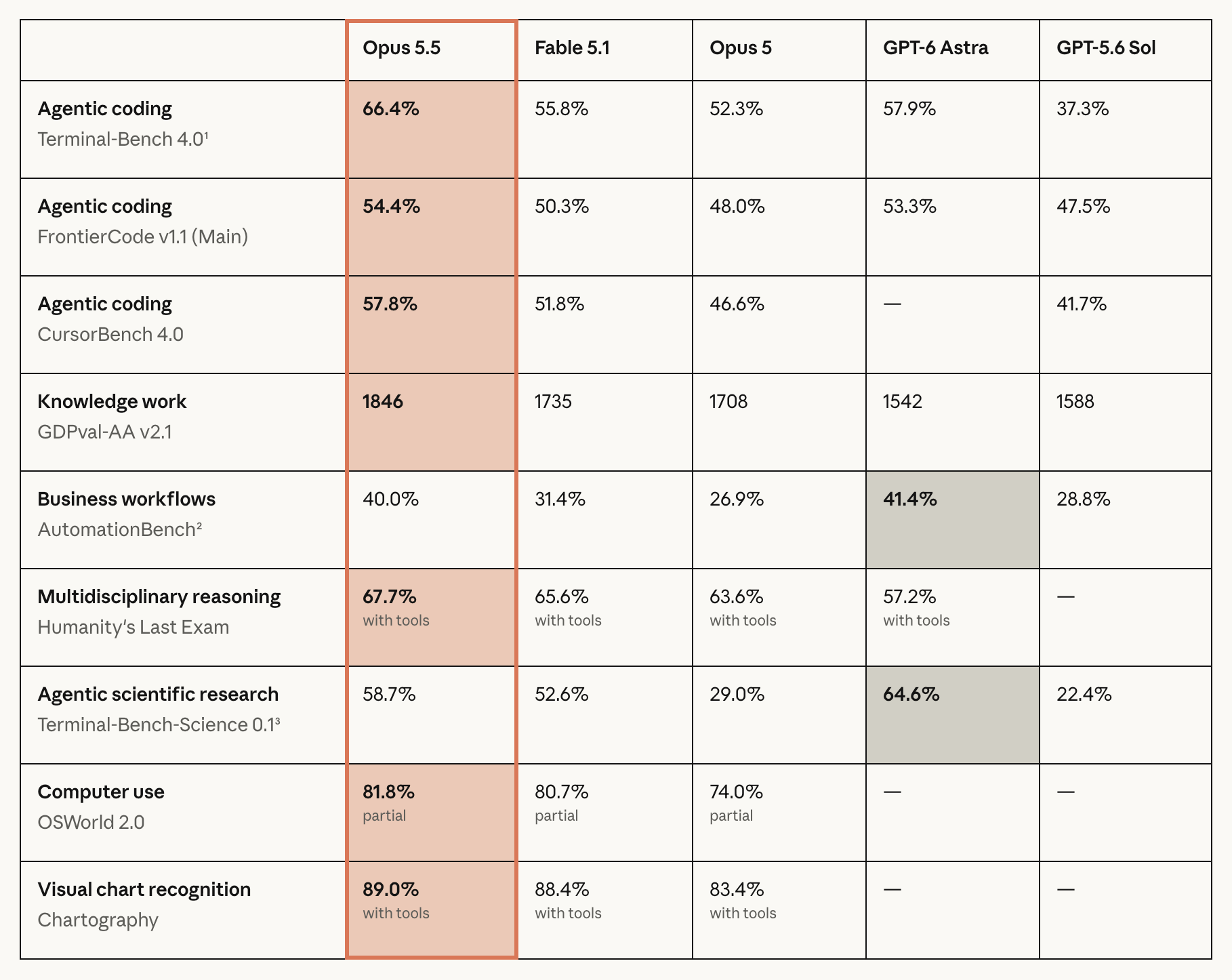
Source: Anthropic’s release page. Original figure and model names retained; select the image to open it at full resolution. The text table below is copyable and scrolls horizontally on mobile.
| Benchmark | Opus 5.5 | Fable 5.1 | Opus 5 | GPT‑6 Astra | GPT‑5.6 Sol |
|---|---|---|---|---|---|
| Terminal‑Bench 4.0 · terminal coding | 66.4% | 55.8% | 52.3% | 57.9% | 37.3% |
| FrontierCode v1.1 Main · code changes | 54.4% | 50.3% | 48.0% | 53.3% | 47.5% |
| CursorBench 4.0 · multi-file coding | 57.8% | 51.8% | 46.6% | — | 41.7% |
| GDPval‑AA v2.1 · knowledge work (Elo) | 1846 | 1735 | 1708 | 1542 | 1588 |
| AutomationBench · business workflows | 40.0% | 31.4% | 26.9% | 41.4% | 28.8% |
| Humanity’s Last Exam · with tools | 67.7% | 65.6% | 63.6% | 57.2% | — |
| Terminal‑Bench‑Science 0.1 · scientific tasks | 58.7% | 52.6% | 29.0% | 64.6% | 22.4% |
| OSWorld 2.0 · computer use (partial) | 81.8% | 80.7% | 74.0% | — | — |
| Chartography · chart recognition, with tools | 89.0% | 88.4% | 83.4% | — | — |
Read the table in three ways:
- Coding: distinguish terminal work, multi-file tasks and mergeable changes. One coding benchmark does not cover all software development. Opus 5.5 scores above Fable 5.1 and Opus 5 on all three coding rows here.
- Knowledge work: GDPval uses Elo, not percentages. Do not average it with the other rows. Use it to shortlist models for document and spreadsheet work, then consider the cost curve below.
- Task differences: Astra scores higher on AutomationBench and scientific tasks. Missing GPT results for computer use and chart recognition are unreported in this table, not zero. Keep the OSWorld partial label and the tool conditions on HLE and Chartography.
Settings matter. Opus 5.5 uses max unless noted; Terminal‑Bench uses Opus xhigh and Astra high. Some Claude tests include safeguard-triggered fallback models; Zapier’s AutomationBench runs do not. Opus 5.5’s Terminal‑Bench standard error is ±2.6 percentage points; scientific-task errors are about ±3.5–5 points per model. Small gaps do not establish a decisive ranking. Full evaluation footnotes.
Knowledge work: compare capability and task cost together
A stronger result can come from spending more, or from doing better at a similar cost. The GDPval‑AA v2.1 curve brings both questions into view, making it particularly useful for comparing Opus 5.5, Fable 5.1 and Astra.
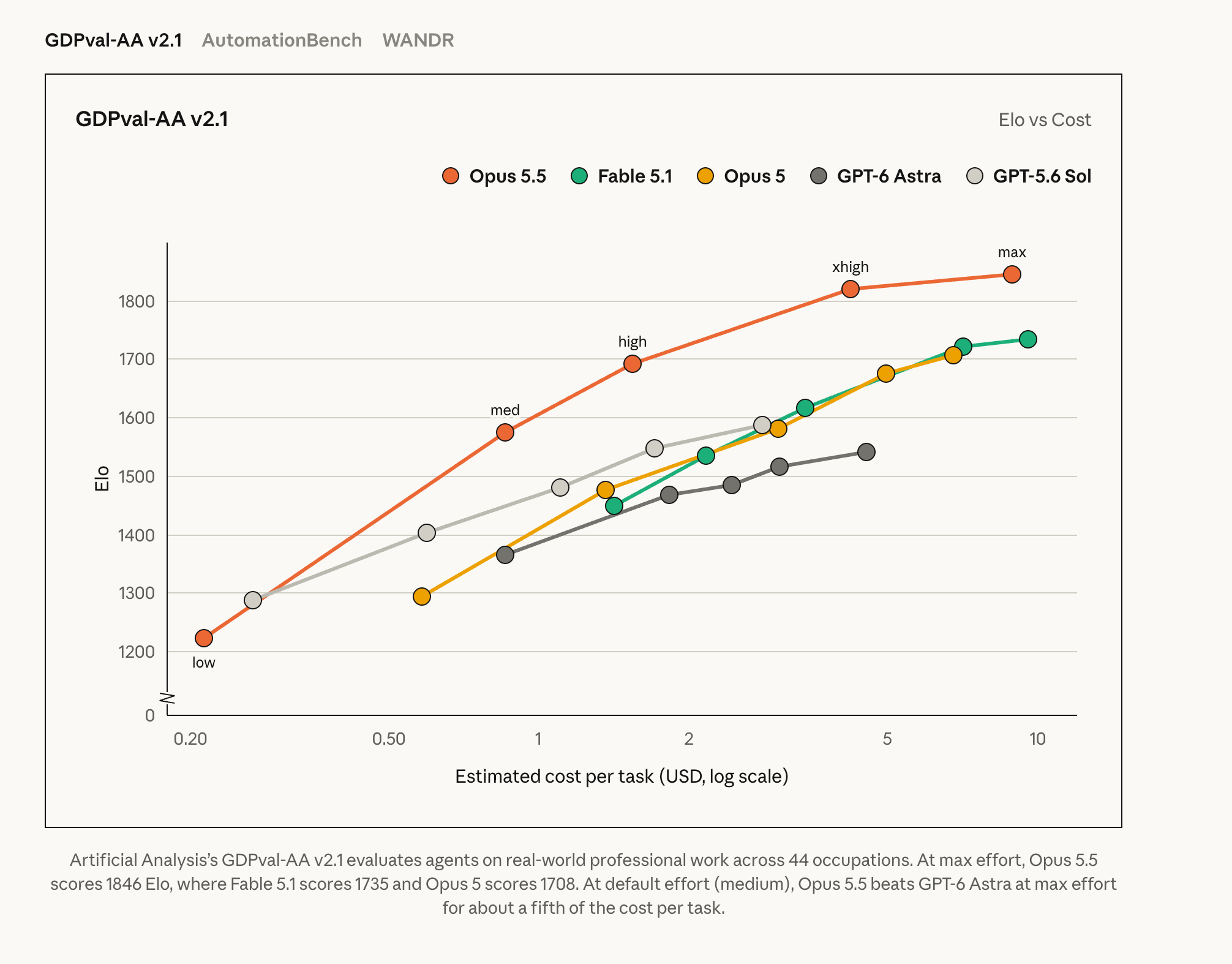
Source: Anthropic’s knowledge-work evaluation, using Artificial Analysis’s GDPval‑AA v2.1 across 44 occupations. The original legend, axes and caption are retained. Select the image to open it at full resolution.
Read three details carefully:
- The horizontal axis is estimated cost per task, not a per-million-token rate. Its logarithmic scale means equal distances represent equal cost ratios, not equal dollar increments.
- The vertical axis is Elo; higher is better. There is an axis break above zero. Do not interpret visual height differences as percentage gains in capability. At similar scores, a point further left has a lower estimated cost.
- A model is a set of operating points. Opus 5.5’s low-to-max labels show how score and cost change together. Record reasoning effort when you trial models.
At the highest effort shown, Opus 5.5 scores 1846 Elo, Fable 5.1 scores 1735 and Opus 5 scores 1708. Anthropic also reports that Opus 5.5 at its default medium effort exceeds Astra at max for about one fifth of the estimated task cost. That is a result for this evaluation and configuration, not evidence of an 80% saving on every business workload.
For practical selection, start by comparing default effort, then increase effort for tasks that fail acceptance. This helps separate a poor model fit from insufficient reasoning effort, without putting every simple task on the most expensive setting.
Estimate a completed task, not just a token rate
Here is a reproducible example: 100,000 uncached input tokens and 10,000 billable output tokens, with no cache writes, tool fees or other surcharges.
| Model | Calculation | Token cost |
|---|---|---|
| Opus 5.5 | 0.1 × $4 + 0.01 × $20 | $0.60 |
| Fable 5.1 | 0.1 × $10 + 0.01 × $50 | $1.50 |
| Opus 5 | 0.1 × $5 + 0.01 × $25 | $0.75 |
| GPT‑6 Astra | 0.1 × $10 + 0.01 × $50 | $1.50 |
| GPT‑6 Sol | 0.1 × $2 + 0.01 × $10 | $0.30 |
| GPT‑6 Luna | 0.1 × $0.10 + 0.01 × $0.50 | $0.015 |
This arithmetic holds token counts constant. It is not a measured bill for these models completing the same job. Count any reasoning tokens the provider bills, rather than counting only the answer visible on screen.
To choose a team default, try three small tasks with known correct outcomes: a code fix, a source check and a structured extraction. Give each model the same inputs and acceptance criteria. Record its ID, reasoning effort, tool permissions, elapsed time, charges and human corrections.
Decide whether each result is deliverable before comparing cost per accepted result. For a practical record of review and rework, see measuring the value of an AI workflow.
A 1M window is capacity, with a cost
Opus 5.5 and Fable 5.1 document 1M-token context windows; GPT‑6 Astra, Sol and Luna document 1.05M. The window accommodates input, conversation history, tool results and generation; it is not all available for a single uploaded document. Claude · Astra · Sol · Luna.
A larger window helps when several sources must remain in view. It does not resolve outdated information, contradictory documents or missing citations. Having the agent locate relevant files and bring in the material it needs remains easier to audit than indiscriminately loading an entire project.
Above 272K input tokens, GPT‑6 charges the full request at twice the short-context input/cache rates and 1.5 times the output rate. For Astra, 300,000 uncached input tokens plus 10,000 billable output tokens cost 0.3 × $20 + 0.01 × $75 = $6.75, excluding tools and other surcharges. Long-context pricing.
There is also a client-side distinction: a model that supports 1M does not guarantee that a conversation is configured to use it. After connecting a provider in Onevium, check the selected model entry and the session window.
Connect Claude and GPT in Onevium
Onevium supports Claude Code sign-in, Anthropic API connections and OpenAI Responses connections. You can manage a project in one desktop workspace and choose different providers and models in separate conversations. Start with the provider connection guide, then compare a small task from your own work.
The new Opus 5.5 and GPT‑6 Sol/Luna presets and compatibility updates come with Onevium 1.2.2, scheduled for September 23, 2026. Update to 1.2.2 or later once the stable release is available, then follow the steps below to connect your provider and select these new models.
- With a Claude Code account, open the Claude Code connection status panel, choose sign-in and complete authorization in the built-in terminal.
- With an API key, open Settings → Providers → Add AI Service and select Anthropic, or OpenAI under chat services. For GPT tool tasks, use the OpenAI preset’s Responses connection.
- Enter that provider’s API key and save. A Onevium license, a Claude subscription and API usage credits are separate things.
- Create a conversation and select the provider and an available model below the composer. If a supported model is hidden, check Manage Models. The model entries and role mapping guide explains custom fields.
- Verify a short message, then ask the agent to read a test file without changing it. Saving a connection or passing Check configuration does not establish that upstream requests and tool calls both work.
Enable and verify 1M context in Onevium
Use GPT‑6 Astra, already covered by the connection guide, as the example. First verify a short reply. Then open Settings → Providers → your connection → Manage Models → Add custom model, and expand the new row’s Advanced fields:
| Field | Value |
|---|---|
| Model ID | gpt-6-astra[1m] |
| Upstream model ID | gpt-6-astra |
| Display name | GPT-6 Astra (1M) |
Enable the entry, save it and start a new conversation using GPT-6 Astra (1M). Send /context and confirm a total of 1m. Send another short message to check that the connection still works. Changing only the window value used by the usage meter does not replace this model-entry configuration.
The local model ID carries [1m]; the upstream ID stays plain. Do not put the suffix into the upstream field or add it to a model that does not actually support 1M. These checks establish the session configuration and short-request connectivity, not a million-token load test.
Claude connections work differently. For older Claude models that need explicit activation, use Settings → Claude CLI → 1M Context Window. A custom Anthropic-compatible endpoint also needs Advanced Options → Endpoint supports 1M context, after the service confirms support. For native 1M models, check the window recognized by your installed version; do not copy the GPT upstream-field setup indiscriminately.
The 1M context guide covers connection types, role and child-session limits, and troubleshooting when 200k does not become 1m. Connect the provider, confirm the window, then start comparing a real task with an explicit acceptance check.