Make the handoff something a colleague can check
A customer call ends. One colleague writes “demo next week”; another writes “purchasing timeline undecided.” Later, someone has to update the customer record. Which opportunity does the note belong to, and who confirmed the date? A polished AI summary can create more work if it quietly turns a suggestion into a commitment.
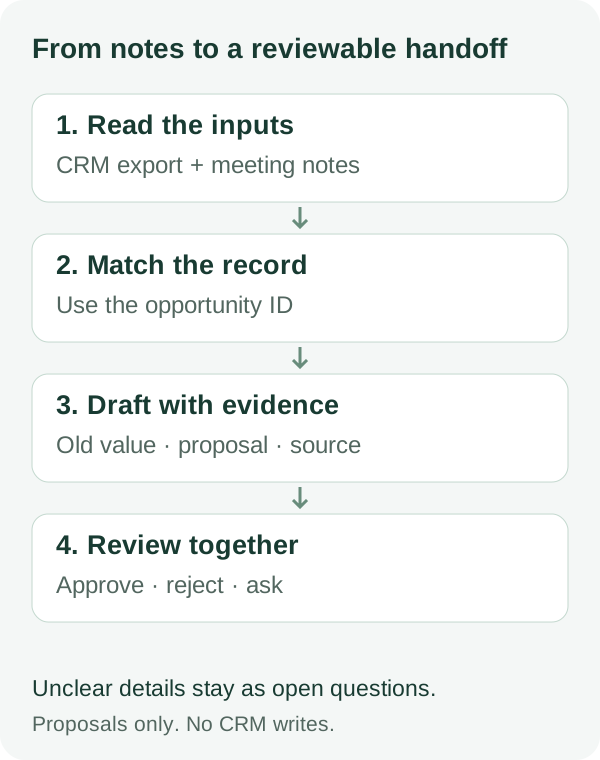
The useful output is a small review packet: what might change, the evidence for it, and what still needs confirmation. A customer relationship management system, or CRM, stores the customer and opportunity records that the team relies on.
This is an original Onevium exercise with fictional customers, people, dates, and records. The download includes inputs and manually checkable answers. You must run and review your own model response; the answer key is not a measured Onevium result.
Borrow the order of operations
On September 15, Anthropic described Salesforce in Claude: customer context supports call preparation, and meeting notes can become proposed CRM updates, with seller approval requested by default before changes are written. Its accompanying revenue-team guide highlights ownership, scope, and measurement when rolling AI out across a team.
The transferable idea is to make evidence and proposed changes visible before deciding to update anything. Our exercise uses exported files, with no Salesforce connection. The official plugin and connectors are Claude features; we have not verified that they work directly in Onevium.
Open a separate practice folder
Download and extract the starter ZIP. crm.csv is the original customer table; meeting-notes-en.md contains the English notes, with a Chinese equivalent alongside it. Keep expected-review-en.md and its translation out of the AI input: they are your answer keys.
In Onevium, choose Add project beside Projects, select Open existing folder, and pick the extracted directory. Create a conversation under that project. Check its working directory, provider connection, and file tools. You do not need to initialize Git or install a CRM plugin.
Use Browse all files at the top of the conversation to inspect both inputs. Three opportunities fit comfortably in one conversation. Understand that result before expanding the workflow.
Four notes, four different decisions
In crm.csv, O101 and O103 both belong to Northstar; O102 belongs to Cedar. All three have stage set to qualification. The next_step field describes an action, and due_date is the date for that action, not a projected close date.
Notes retain identifiers N1–N4 so every proposal can point back to evidence. A company can have multiple opportunities; its name alone is not a safe match.
| Note | Known information | Treatment |
|---|---|---|
| N1 / O101 | Customer requests a security checklist; Mina will send it September 18 | Draft action and due-date proposals for owner review |
| N2 / O102 | September 21 demo proposed; customer has not confirmed; no owner | Keep original values; ask for confirmation |
| N3 / O101 | Purchasing timeline remains undecided | Do not infer a stage or close date |
| N4 / Northstar | Company name only; no opportunity ID | Could mean O101 or O103; ask which record |
Give Onevium a bounded task
Ask it to read only the named inputs and return two tables in the conversation. Your colleague can review the proposals before any file changes. A prompt expresses scope; it is not a permission sandbox. Check the actual action when a tool asks for approval.
Read only crm.csv and meeting-notes-en.md
in the current project. This is fictional practice data.
Do not use the network or connect to business systems.
Do not read any expected-review files.

Report which files you actually read. Return two tables:
1. Proposed updates: opportunity ID, field, old value,
   proposed value, note ID, evidence, review status.
2. Open questions: issue, affected record, and the person
   or information needed to resolve it.

Match only explicit opportunity IDs, not company names.
Keep original values when dates are unconfirmed,
owners are missing, or evidence is insufficient.
Do not infer stages, close dates, or promises.
If the CSV has no field, use a review note; add no fields.
Mark every proposal as awaiting owner review.
Do not change inputs, update CRM, or send messages.
Review the details, not the fluency
Open expected-review-en.md in Browse all files and compare it with the model response. N1 supports two proposed field changes on one opportunity. They are still proposals, not permission to write.
Mina is the follow-up owner named in N1, but this CSV has no owner field. Keep that information in a review note. N2 does not establish a confirmed demo date. N4 cannot be assigned to O101 merely because it appears after a note about that opportunity.
- Keep every stage at qualification. There is no close-date field in this exercise.
- Do not propose writable changes for O102 or O103. Keep N2 and N4 in the open-question list.
- Every proposal points to a note identifier. Label missing information as not stated.
- The original CSV and notes remain unchanged. No messages or business-system writes occur.
| Field | Old value | Proposed value |
|---|---|---|
| O101 · next_step | Send product overview | Send security checklist |
| O101 · due_date | 2026-09-17 | 2026-09-18 |
Give the next colleague the evidence they need
After review, explicitly ask the AI to create only a new review-summary.md containing the proposals and open questions. If that file exists, report it instead of overwriting it. Inspect the saved file through Browse all files. A folder without Git may not show change counts; opening a file does not mean a Git commit happened.
The owner should be able to approve, reject, or defer individual proposals and record the decision date. Updating the customer system is a separate, explicitly authorized step, followed by reading the record back to verify the result. This exercise does not perform that step.
If a colleague later says “the customer confirmed September 23; Kai owns the demo,” preserve that as new evidence and review O102 again. Do not rewrite N2 to make the original notes look complete.
Use a team when the work needs separate ownership
With many meeting batches, different customer owners, and work that needs ongoing conversations, consider Onevium @Team. First confirm that the team Skill and Sessions tools are available, review the proposed responsibilities and usage estimate, and confirm the plan. This three-record exercise does not need a team just to demonstrate the feature.
One possible division: a first member maps evidence to record IDs; a second reads that mapping and checks proposed fields; the lead consolidates questions and verifies the handoff. The second step depends on the first and should run afterward. Independent customer batches can run in parallel.
Each member writes its own output and reads shared inputs. Give each opportunity one writer. The lead checks files and evidence after members report completion. A team can organize the work, but it cannot confirm customer commitments on the business owner’s behalf.
Decide whether it helps your team
Pilot on a small, approved, redacted sample and apply the same human review standard throughout. Track preparation time and review time separately, plus missed explicit actions, unsupported proposals, and wrong record matches. Faster generation does not establish a faster overall process.
The handoff is useful when a colleague can find the source, understand what needs confirmation, and continue without rereading the whole conversation. If record mix-ups, guessed dates, or input changes recur, narrow the task, improve the prompt and permissions, and validate again before connecting real writes.
Once the method works for your team, turn its field rules, evidence format, and review conventions into a reusable Skill. Keep ambiguous and incomplete examples as checks instead of expanding one convincing answer into an automatic process.